
What scale is this drawing?
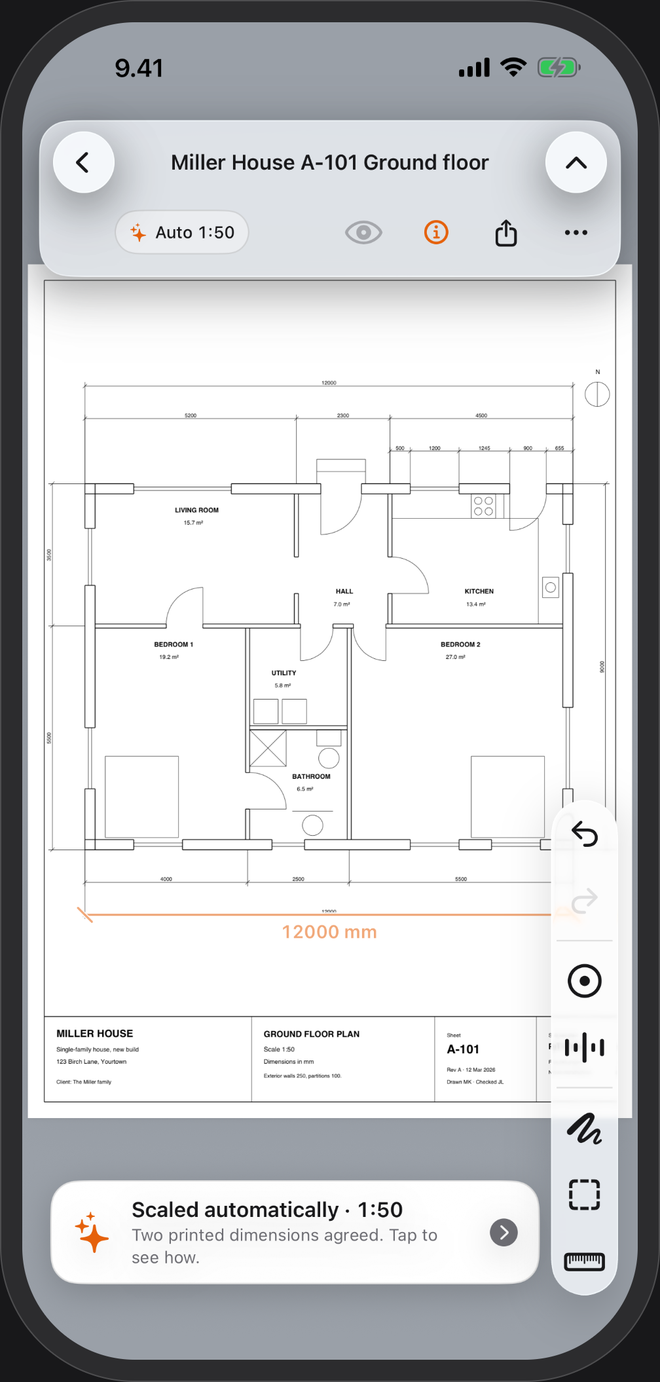
The title block says 1:50. The PDF on your screen is whatever size your screen is. PlanTape skips the guessing: it reads the dimensions printed on the sheet and sets the scale from them as the plan opens.
No account · No cloud · Works offline · iPhone, iOS 26+
What a scale like 1:50 means
One unit on the drawing is fifty of the same unit in the building: 1 mm on the sheet is 50 mm on site, and 2 cm is a metre. At 1:100, 1 cm on the sheet is a metre. Floor plans are usually 1:50 or 1:100, site plans 1:200 or 1:500, details 1:5 to 1:20.
US drawings write the same idea as a length per foot:
| Written on the sheet | As a ratio |
|---|---|
| 1/8″ = 1′-0″ | 1:96 |
| 3/16″ = 1′-0″ | 1:64 |
| 1/4″ = 1′-0″ | 1:48 |
| 1/2″ = 1′-0″ | 1:24 |
| 1″ = 20′ (site plans) | 1:240 |
Why a PDF loses its scale
A scale is only true on the paper size the drawing was made for. Print an A1 sheet on A3 and 1:50 becomes roughly 1:100; print with "fit to page" and it becomes something nobody wrote down. On a phone the drawing is as big as you zoom it. So a scale ruler held to a print — or to a screen — needs checking against a dimension you trust first.
The dimensions the designer typed on the sheet don't change with the paper. That's why PlanTape takes its scale from them, not from the size of the print.
How PlanTape sets the scale
Automatically, as it opens
It reads the dimensions printed on the sheet and sets the scale from them. The scale card is tagged Auto; tap it to see the dimension it trusted, then accept it or set your own.
From a length you know
No printed dimensions? Trace one you know, type its length, and the sheet is to scale — like checking a print with a scale rule, without the rule.
Page by page
In a multi-page set every page keeps its own scale, and a review table shows which pages are set, unsure or scanned.
Metric or imperial
It reads millimetre and metre dimensions, and feet-and-inch ones on US plans. Feet and inches →
Questions
What if the automatic scale looks wrong?
Tap the scale card. It shows the dimension it used; if you disagree, trace a dimension you trust and type its length. Your scale replaces the automatic one.
How do I check a scale myself?
Measure a second printed dimension and compare it with the number printed next to it. If both agree, the scale is right.
Does automatic scale work on scanned plans?
No — it needs a vector PDF, the kind exported from CAD, because only that has dimension text and lines to read. On a scanned plan, trace a length you know instead.